
Input devices
The definition of input devices varies, but for RMK, we focus on two categories: keys and sensors.
- Keys are straightforward — they are essentially switches with two states (pressed/released).
- Sensors are more complex devices that can produce various types of data, such as joysticks, mice, trackpads, and trackballs.
Events
The event from input devices are defined in rmk/src/event.rs. The Event is an enum with many variants, but in RMK, there are two types of Event:
KeyboardEvent:KeyboardEventis the event processed by built-inKeyboardwith default key processing logic.KeyandRotaryEncoderare now processed asKeyboardEvent.- Other Events: All other events in the system, such as events from joystick or trackpad. For those events, a custom
Processoris needed for processing the event.
Usage
RMK uses a standard pattern for running the entire system:
Notes:
- If the input devices emit only
KeyboardEvent, use onlyrun_device!((matrix, device) => EVENT_CHANNEL))is enough, norun_processor_chainis needed. Because allKeyboardEvents are automatically processed byKeyboard EVENT_CHANNELare built-in, you can also use your own local channels- The events are processed in a chained way, until the processor's
process()returnsProcessResult::Stop. So the order of processors in therun_processor_chainmatters - For advanced use cases, developers can define custom events and procesors to fully control the input logic
- The keyboard is special -- it receives events only from
KEY_EVENT_CHANNELand processesKeyboardEvents only.KeyboardEventfrom ALL devices are handled by theKeyboardprocessor, then the other events are dispatched to binded processors
Implementation new devices
RMK's input device framework is designed to provide a simple yet extensible way to handle both keys and sensors. Below is an overview of the framework:
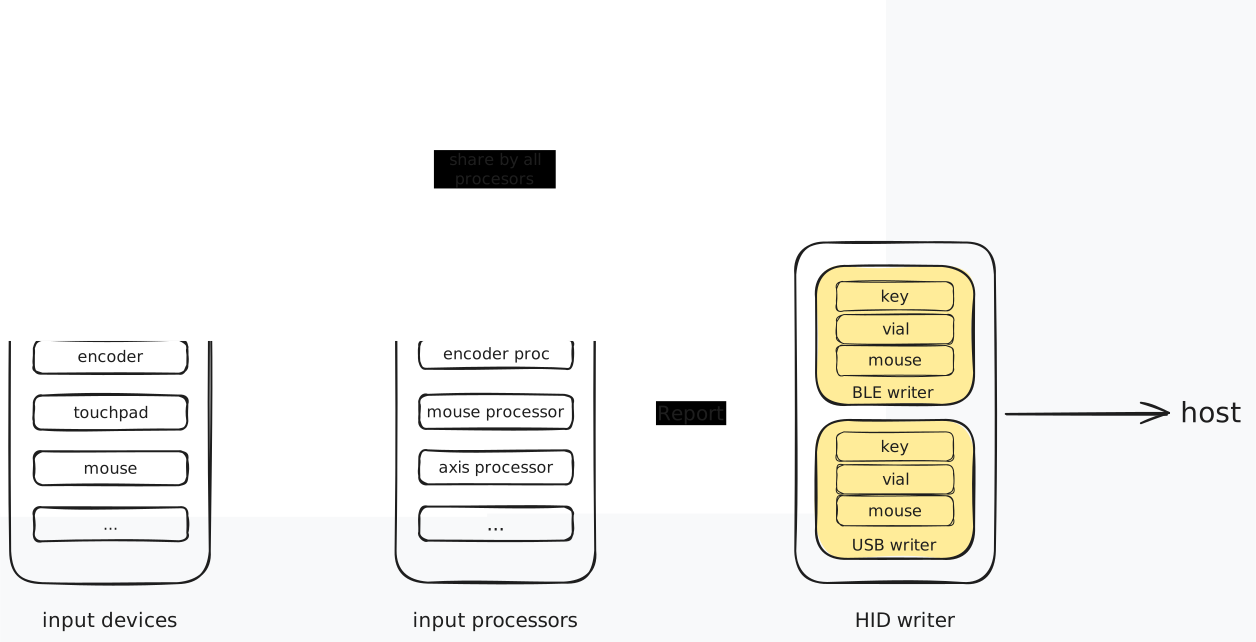
To implement a new input device in RMK, you need to:
- Create a struct for your device that implements the
InputDevicetrait - Define how it generates events by implementing the
read_event()method - Use it with
run_devices!to integrate into RMK's event system
Input device trait
Input devices such as key matrices or sensors read physical devices and generate events. All input devices in RMK should implement the InputDevice trait:
This trait is used with the run_devices! macro to collect events from multiple input devices and send them to a specified channel:
Why
run_devices!?Currently, embassy-rs does not support generic tasks. The only option is to join all tasks together to handle multiple input devices concurrently. The
run_devices!macro helps accomplish this efficiently.
Runnable trait
For components that need to run continuously in a task, RMK provides the Runnable trait:
The Keyboard type implements this trait to process events and generate reports.
Event Types
RMK provides a default Event enum that is compatible with built-in InputProcessors:
The Event enum aims to cover raw outputs from common input devices. It also provides a stream-like axis event representation via AxisEventStream for devices with a variable number of axes. When using AxisEventStream, the Eos event must be sent to indicate the end of the sequence.
Input Processor Trait
Input processors receive events from input devices, process them, and convert the results into HID reports for USB/BLE transmission. All input processors must implement the InputProcessor trait:
The process method is responsible for processing input events and sending HID reports through the report channel. All processors share a common keymap state through &'a RefCell<KeyMap<'a, ROW, COL, NUM_LAYER>>.
Input Devices
RMK supports various input devices beyond just key matrices. The input system consists of two main components:
Input Device Trait
Each input device must implement the InputDevice trait, which requires:
- A
read_event()method to read raw input events
Example implementation:
Runnable Trait
For components that need to continuously run in the background, RMK provides the Runnable trait:
The Keyboard type implements this trait to process events and generate reports.
Input Processors
Input processors handle events from input devices and convert them into HID reports. A processor:
- Receives events from one or more input devices
- Processes those events into HID reports
- Sends the reports to USB/BLE
The InputProcessor trait defines this behavior with:
- A
process()method to convert events to reports - A
send_report()method to send processed reports
Built-in Event Types
RMK provides several built-in event types through the Event enum:
Key- Standard keyboard key eventsRotaryEncoder- Rotary encoder rotation eventsTouchpad- Multi-touch touchpad eventsJoystick- Joystick axis eventsAxisEventStream- Stream of axis events for complex input devices
Running Devices, Processors and RMK
RMK provides a standardized approach for running the entire system with multiple components:
This pattern is used across all RMK examples and provides a clean way to:
- Read events from input devices and send them to a channel
- Process those events with a keyboard processor
- Handle all RMK system functionality in parallel